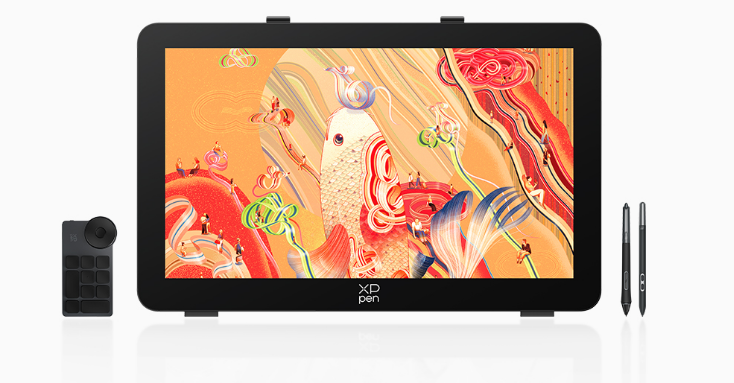
Digital creativity has changed the way artists and designers make art. Starting from illustrations, graphic design, animation, and even image manipulation, digital devices are now being increasingly used by more artists.
A digital drawing tablet is unlike a mouse as it is specifically designed for drawing purposes. The use of high-sensitivity technology helps in making digital drawings in an easier way.
Thus, what is a digital drawing tablet? How does it work, and which one should you purchase? Here are some answers to all your questions about digital drawing tablets.
1. What Is a Digital Drawing Tablet?
A digital drawing tablet is an input device that allows users to create digital artwork by using a specialized stylus instead of a traditional mouse. It captures the movement, pressure, and angle of the pen and converts these actions into digital signals that can be recognized by a computer or drawing software.
Simply put, it acts as a bridge between traditional drawing techniques and digital creation. The artist can use the stylus just like a normal pen or brush, and the movements will be translated to digital strokes by the tablet.
A typical drawing tablet system includes several key components.
Stylus Pen
The stylus is one of the most important parts of the device. The digital pen has the capability of detecting various levels of movement and pressure, unlike the traditional mouse.
For example:
· Light pressure creates thinner strokes;
· More pressure produces thicker or darker lines;
· Different angles can create various brush effects.
Modern devices often support thousands of pressure levels. Many professional models provide 8,192 levels of pressure sensitivity, while some newer products can reach 16,000 levels or higher, offering more detailed control over line variation.
Drawing Surface and Display
Digital drawing tablets come in two basic varieties.
Firstly, there is a regular pen tablet without any screen attached. The user draws using the tablet, seeing the outcome on the computer screen. Such a tablet is typically inexpensive and perfect for novices.
Secondly, there is a pen display. It features an attached screen that enables one to draw directly onto the screen. It offers better hand-eye coordination and is popular among professionals.
2. How Does a Digital Drawing Tablet Work?
A digital drawing tablet works through a combination of electromagnetic sensing, pressure detection, and digital signal processing technology.
How Does the Stylus Create Digital Lines?
When a user slides the stylus on the tablet surface, the sensors within the tablet will recognize the location of the pen. Simultaneously, the tablet will gather further details such as the pressure applied and the tilt angle.
Movement of the stylus → Sensor recognition by the tablet → Data processing → Digital brushstroke
For instance, during operations with software such as Adobe Photoshop or Clip Studio Paint, pressure information will be transmitted from the tablet to the software, making it possible for the brush size, opacity, or texture to vary depending on the user’s drawings.
This instantaneous response makes digital drawings much easier than using a mouse.
Why Is Pressure Sensitivity Important?
Pressure sensitivity determines how accurately a tablet can recognize different levels of force.
Common pressure levels include:
· 2,048 levels: suitable for basic drawing tasks;
· 8,192 levels: widely used for professional creative work;
· 16,000+ levels: designed for users who need extremely detailed control.
For artists who create realistic shading, textured strokes, or complex illustrations, higher pressure sensitivity can provide a smoother and more natural drawing experience.
3. What Can a Digital Drawing Tablet Be Used For?
Today, a digital drawing tablet is used in many creative industries. It is no longer limited to simple sketching but has become an important tool for professional digital production.
Digital Illustration and Character Design
Illustrators often use tablets for:
· Character creation;
· Comic drawing;
· Concept art;
· Game design sketches.
The ability to control line thickness and brush effects makes it easier to express artistic style and create detailed artwork.
Graphic Design and Visual Projects
Graphic designers use drawing tablets for tasks such as:
· Logo creation;
· Poster design;
· Branding projects;
· Custom visual elements.
Compared with a mouse, a stylus provides better accuracy when adjusting small details or creating hand-drawn elements.
Photo Editing and Retouching
Professional photographers and designers also use tablets for image editing.
Common applications include:
· Portrait retouching;
· Color adjustments;
· Detailed corrections.
The pen has the ability to give precise control over particular regions.
Animation and Game Development
In the animation and gaming industries, tablets are commonly used for:
· Storyboard creation;
· Character sketches;
· Scene design;
· Digital painting.
For creators who spend many hours working, a comfortable and responsive device can make a noticeable difference.
4. How to Choose the Right Digital Drawing Tablet?
Choosing the right digital drawing tablet depends on your creative needs, workflow, and experience level. A higher specification does not always mean it is the best option for every user.
Consider the Drawing Size
The active drawing area directly affects comfort and control.
Smaller tablets are easier to carry and suitable for beginners or occasional creators. Larger devices provide more working space and are often preferred for professional illustration, animation, and design projects.
Common size choices include:
· Around 10 inches: suitable for learning and everyday use;
· 13-16 inches: a balanced choice for most creators;
· 20 inches or larger: mainly used in professional studios.
Pay Attention to Pen Technology
Pressure sensitivity is important, but it is not the only factor to consider. Users should also look at:
· Pen response speed;
· Tilt support;
· Cursor accuracy;
· Overall drawing feel.
A smooth pen experience can significantly improve creative efficiency.
For example, the XPPen Artist 16 3rd is designed for creators who need a more efficient drawing workflow. It features the X4 Smart Chip Stylus, supports 16K pressure levels, and includes an Innovative X-Dial micro dial for quick adjustments such as brush control and canvas navigation. These features can help artists reduce repetitive operations during daily creative work.
Check Software Compatibility
Before purchasing, make sure the tablet works well with your preferred programs, including:
· Adobe Photoshop;
· Adobe Illustrator;
· Clip Studio Paint;
· Blender.
Good compatibility ensures a smoother creative process.
5. How to Use a Digital Drawing Tablet More Effectively?
Even with a high-quality device, proper setup and usage habits can greatly improve the overall experience.
Adjust the Settings
Most tablets allow users to customize:
· Pressure curves;
· Shortcut buttons;
· Pen sensitivity.
Adjusting these settings based on personal preferences can make the device feel more natural.
Maintain Comfortable Working Habits
Since digital creation often involves long working hours, users should pay attention to:
· Maintaining a comfortable posture;
· Avoiding excessive wrist pressure;
· Taking regular breaks.
Healthy working habits can help improve both comfort and productivity.
Conclusion
The digital drawing tablet is an essential component that serves as the bridge between conventional and digital methods of drawing. With pressure sensitivity, accurate tracking capabilities, and improved pen technology, the process of creating digital artwork becomes easier and more intuitive.
Are you a novice digital artist or a professional designer involved in creative projects? Picking up the right tool will help you make your life easier. Should you have any doubts concerning digital drawing equipment or assistance in setting it up, do not hesitate to contact us.